





Discuss, learn, ask, suggest, share all things DQ&C π
Recently active
We created a number of data quality business rules that will fail records from the source file we are reading.Β 1.5 Million records.How do you port the failed records to a flat file?Β There is no drill down in One Desktop so we are having issues getting business users approval on code without seeing the failed records?
I have a rule binded to 2 columns in a catalog item.By mistake i have changed the data type of those columns without unbinding the rule.Now i am unable to unbind thise rules from that column.i am getting error while saving or publishing the project : server refused sent data as invalid.Β Please guide me,what i will do here
βHow to tune/optimize a DQC load plan?In day-to-day life, the consultants may come across several performance issues of various magnitude in their load plans at some point in the projects. There are several optimization tips mentioned below for tuning the long running plans.Check the memory allocationDQCΒ plansΒ store the data while processing, which meansΒ that the more input data there is, the more memory DQC will require.Β Therefore the intensive executions can result inΒ a memory overflow error if the default memory allocated for DQC is consumed. In such cases, an increase of memory could present a solution.Related Errors: OutOfMemoryError: Java Heap Space or GC Overhead Limit Exceeded... java.lang.OutOfMemoryError: unable to create new native thread...Β The memory allocation can be done in several ways,Increasing the memory of the DQC IDE(Desktop) Increasing the memory allocation to specific plan in the IDE Increasing the memory allocation for the entire project in IDE Increasing the me
If you would like to filter e.g. business terms, use:$type == 'businessTerm'Switch to Advanced filtering with AQL (Ataccama Query Language)Terms list before applying a filterFiltering resultsLinkΒ to documentation:Searching Using AQLΒ Expressions
Every step that allows for the input of an expression shows a button calledΒ Template....Β This button can be used to pre-fill theΒ ExpressionΒ field with one from an out-of-the-box list.You can create your own expressions for common or complex repeatable operations, follow these steps:Go toΒ WindowΒ in the top navigation menu and selectΒ PreferencesΒ Navigate the menu toΒ Ataccama DQCΒ and go toΒ Expression EditorΒ and selectΒ TemplatesChoose betweenΒ Expression TemplatesΒ andΒ RegEx TemplatesSelectΒ FolderClick onΒ Add Template..Fill inΒ Name,Β ExpressionΒ andΒ DescriptionConfirm withΒ OK
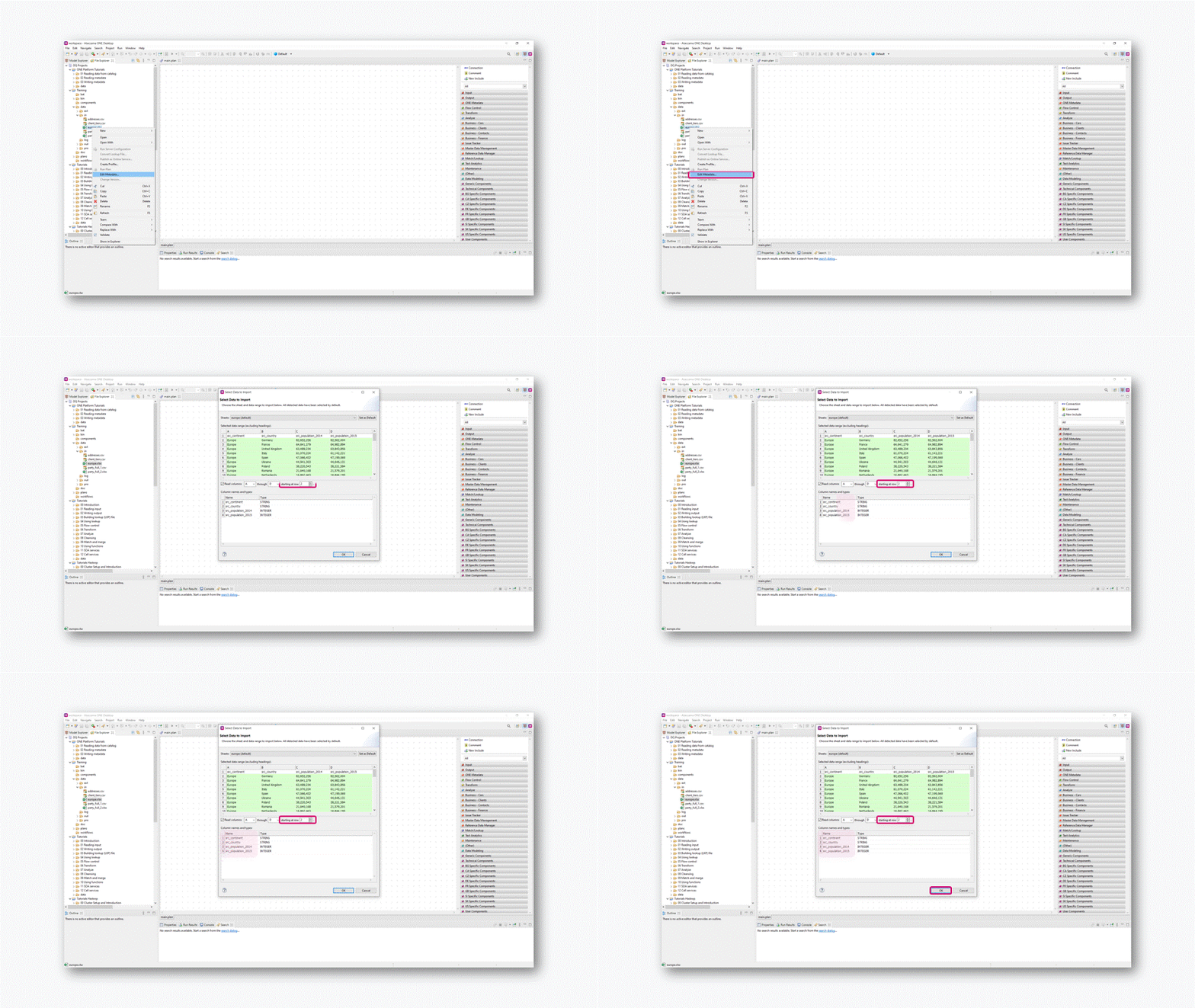
Do you profile an Excel file and are you unable to see the column names?Β DQ Analyzer is not processing the column header andΒ in the profiling results, you see the names of the columns as Field_0, Field_1, etc.You can achieve the desired result by editing the metadata of the file you want to profile.Find the necessary file under theΒ File ExplorerΒ window. Right-click on it and choose theΒ Edit MetadataΒ option. Specify the column you want it to start with. You should be able to see that theΒ NameΒ of the columns will change automatically. You can verify the column type, as well. Then you can profile the file.
Any one can help to createΒ this template using version 13.6?Β It show the itemsΒ clearly.Β Our users can know the data presentation without explanation.Β However, I can find this template in our current version.
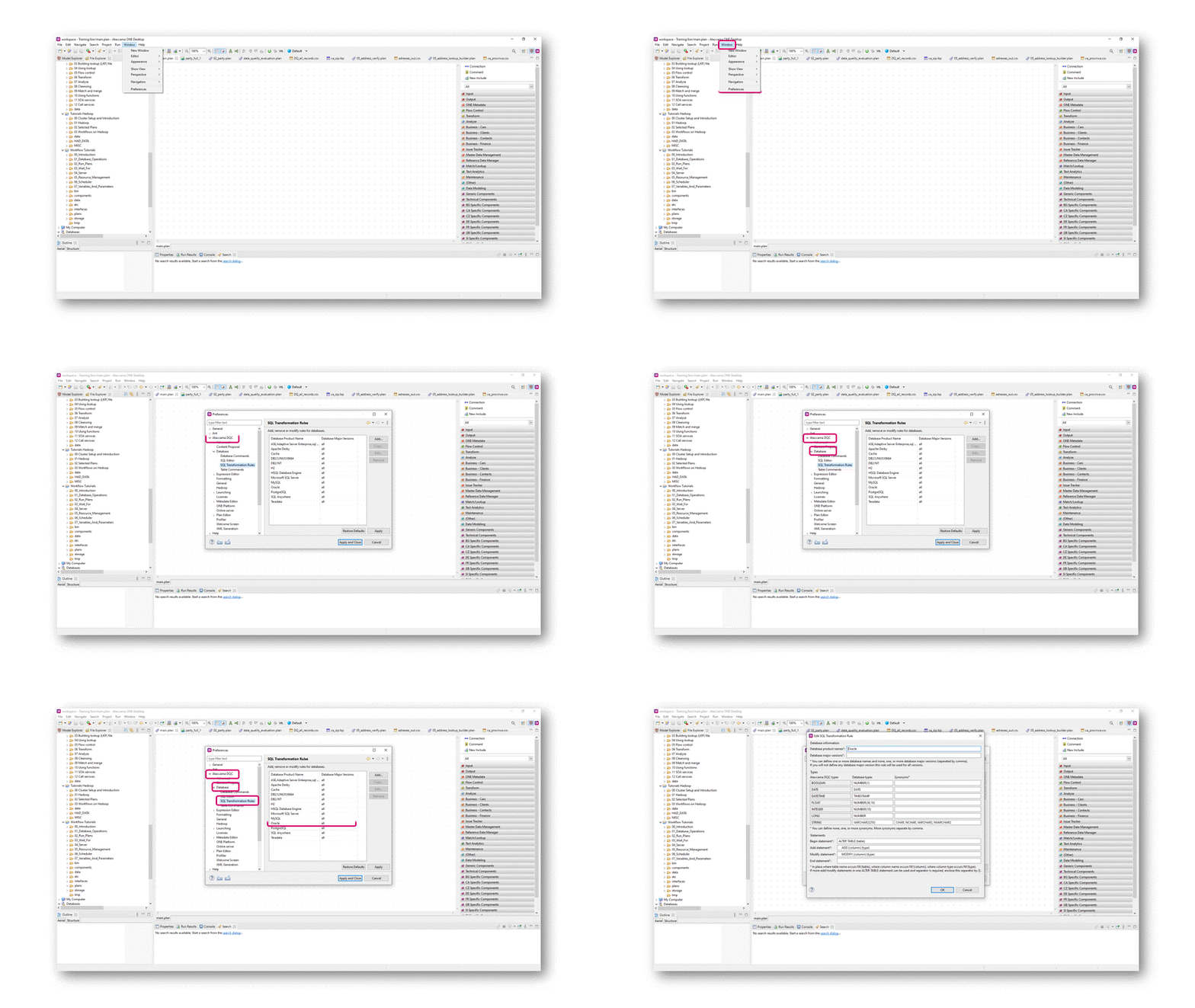
Data type conversions occurrences when working with databases are the natural behaviour of DQC. When reading data from a database (e.g. using JDBC Reader step), the data type is read from the database and transformed into DQC data type.DQC internally works with its own data types. When writing the data back to the database (in such case, JDBS Writer step is commonly used), data type alternation takes place. The rules for data types conversions are defined inΒ SQL Transformation Rules.Β There is a possibility toΒ change from what exact database types there will be a conversion to DQC types.Β To redefine the database types from which DQC will transform data into its own data types:Go toΒ WindowΒ >Β Preferences SelectΒ AtaccamaΒ DQCΒ >Β DatabaseΒ >Β SQL Transformation Rules ModifyΒ SQL transformation rulesΒ of the specific database product you use
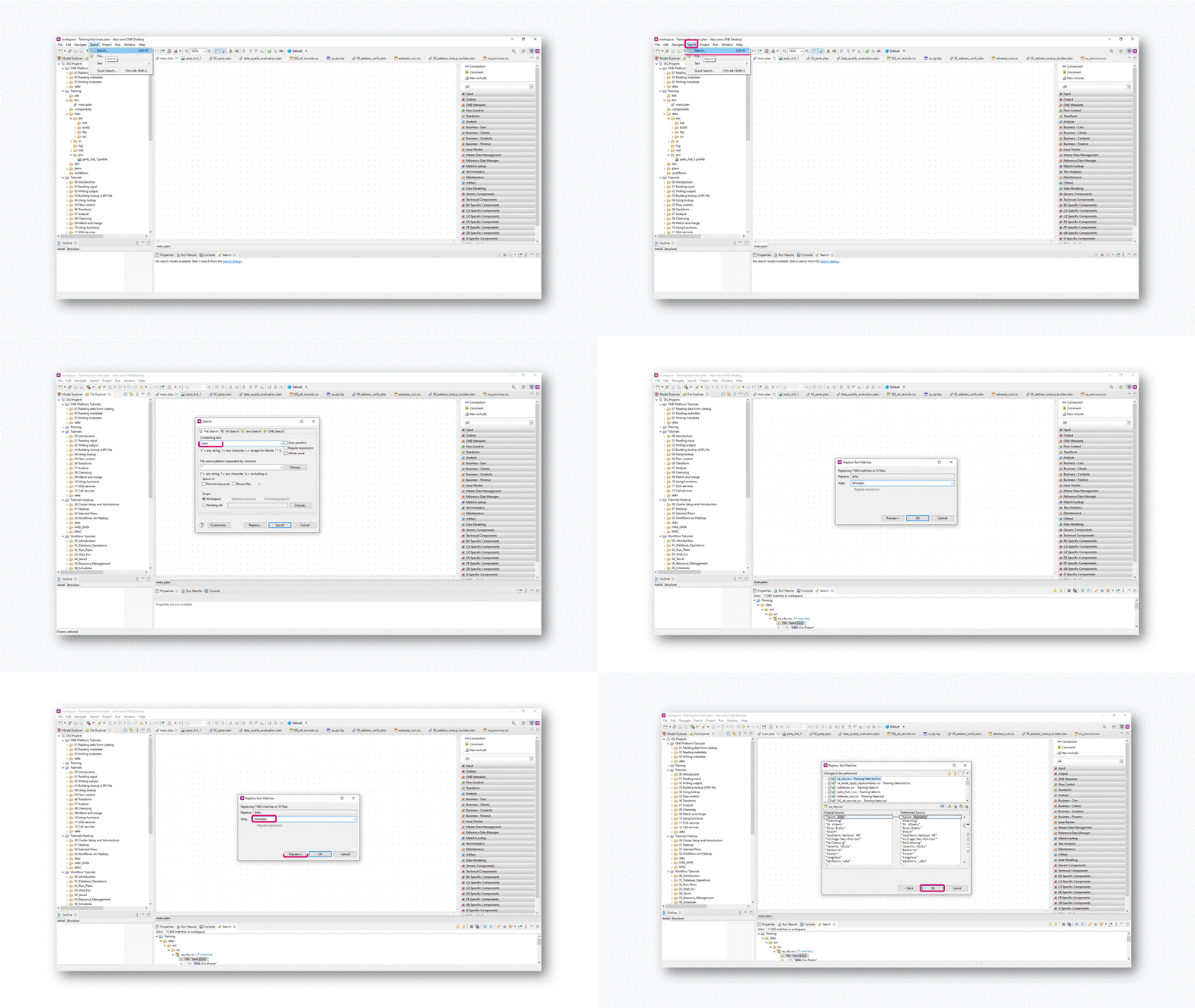
You can find and replace using the Search option in the upper panel of DQC.Click onΒ SearchΒ and enter the text you would like to replace. Click onΒ Replace, and enter the new text you wish to use as a replacement. Clicking onΒ PreviewΒ will display a dialog showing where text was found, and a preview of the XML representation of the plans, before and after the change. You may want to uncheck some of the locations. ClickΒ OK.
Any best practices for using the Purpose function in Ataccama One (webapp)? I see that it is recommended for monitoring projects but when I create a monitoring project I want to be able to search for that tag. Any tips for searching just based on the purpose tag? Iβm very new to Ataccama so any and all tips would be appreciated!
Iβm trying to read the file name of a file so I can write it in an email within a Workflow. Iβm using the βOperate On Fileβ task. The Operation I selected is βINFOβ. I then point to the Source File. Next Iβm trying to determine which variable I use to supply to the Send Email task.Β The Operate On File DocumentationΒ says you can use task variables and the example they give is βnameβ, βlocalNameβ, βsizeβ, and βtimestampβ. When I try using these variables in the Send Email task they just come across as blank in the email (variables appear to be null). Here is the body of the email Iβm using:Β Name = ${name}localName = ${localName}Β Two questions:Does any one happen to know what Iβm doingΒ wrong in above?Additionally is there a way to pull out a file name within a Plan. Iβm using the βExcel File Readerβ step. I want to pass along the file name in the flow so I can use it later on.Β Thanks!
Hi, Iβve just started data profiling with Ataccama One so please bear with me.I have data with technical IDs (e.g. β000123456β, β009876543β,...) in a csv that I imported. The IDs are however interpreted as a number.How exactly can I change the attribute type to text?Β I have done so when importing the file:Β but it seems to go to numbers nonetheless.The original file has comma-separated values that are all between double quotes.Β Thanks for any help!Β edit: typo
I opened the on-prem AtaccamaONE environment this morning and was looking at recent (auto) profiled catalog items. A majority of them are not found - the error is βCatalog item not foundβ and the provided explanation is βThis catalog item doesnβt exist anymore or someone has revoked your accessβ. Neither of these cases should be true as I am the only one who currently works in the environment and Iβm the one who launched the data discovery on 3/09. This is a recent error - I have not seen this before. Any help you could provide would be appreciated.Thanks.
How can we use functionality like βforβ and βwhileβ loop in detection rule field while writing/creating rules for capturing data/records.
Hello, Iβm new with Ataccama and I have a simple problem. I want call a Rest service:https://api.bulkemailverifier.com/api/a/v1?key=xxxxxxxxxx&email=myemail.comIβm using the JSON Call step and If I put the full URL with my email itβs working, but now I want read the emails forma txt file and I donβt know how to make the url dynamic.In the step I have 3Β parameters:Β URL: ResourceΒ I set it asΒ https://api.bulkemailverifier.com/api/a/v1?key=xxxxxxxxxx&email=Method: GETURL: HERE IS WHERE i DONT KNOW WHAT TYPE. I have tried a lot of combinations without successThe input file has one column with the mail: src_mailThanksΒ
How can we download files from remote path ( connected through vpn) on to local?I tried with Operate on File component but it is not working.Is there any work around for it?
Enterprise Data Governance as the management of data across its pipeline - from production to consumption (and retirement). How to enable our βdata fellowsβ to leverage on data to save money, save time and reduce risk?What are the key elements to success? What are your thoughts?Β
I was wondering if there is a way in Ataccama that I can move my rows data into columns?Iβve data as such:Element:Β Β Β Β Β Dimension:Β Β Β Β Β Β Β Β Β Values:Β Β Β Β Β Code:Β XYZΒ Β Β Β Β Β Β ValidityΒ Β Β Β Β Β Β Β Β Β Β Β 200Β Β Β Β Β Β Β Β 678XYZΒ Β Β Β Β Β Β CompletenessΒ Β Β Β Β Β Β 250Β Β Β Β Β Β Β Β 678Β YUPΒ Β Β Β Β Β Β CompletenessΒ Β Β Β Β Β 300Β Β Β Β Β Β Β Β 555Β HIOΒ Β Β Β Β Β Β AccuracyΒ Β Β Β Β Β Β Β Β Β Β 400Β Β Β Β Β Β Β Β 100Β Iβd like it to look like:Element:Β Β Β Β Β Validity:Β Β Β Β Β Β Β Β Β Completeness:Β Β Β Β Accuracy;Β Β Β Β Β Code:Β XYZΒ Β Β Β Β Β Β Β Β 200Β Β Β Β Β Β Β Β Β Β Β Β Β Β Β Β Β 250Β Β Β Β Β Β Β Β Β Β Β Β Β Β 250Β Β Β Β Β Β Β Β 678Β YUPΒ Β Β Β Β Β Β Β 500Β Β Β Β Β Β Β Β Β Β Β Β Β Β Β Β Β 300Β Β Β Β Β Β Β Β Β Β Β Β Β Β 300Β Β Β Β Β Β Β Β 555Β HIOΒ Β Β Β Β Β Β Β Β 200Β Β Β Β Β Β Β Β Β Β Β Β Β Β Β Β Β 450Β Β Β Β Β Β Β Β Β Β Β Β Β Β 400Β Β Β Β Β Β Β Β 100Β Thank you!Β Β
Data Stories provides a wide range of charts, it includes also Pie andΒ Donut ones, even though I do not recommend using them, and the same applies to a Gauge chart. Let's look at the reasoning why and why I'd recommend using a (stacked) bar chart instead.Space usageIn data visualization (reporting, data storytelling) you have limited spaceΒ you can use. Your task isΒ to fill the limited space with the most value for the end viewer/user. Note, most value does not necessarily mean most charts, sometimes one curated chart is far better than five.Β The problem with Pie, Donut and Gauge charts isΒ that they useΒ more space in comparison to anΒ alternative that provides the same value - a bar chart.Β Sales distribution on a Pie ChartMore space is used due to 2 reasons:Pie and Donut charts use AreaΒ to give value to a single category.Β Bar chars use just distance. An Area just takes more space All these charts are circular, which creates unnecessary space around the chart objectBellow find a better al
I am trying to build a component rule where I can compare primary_id from catalog table A to another tableΒ BΒ using join and send primary_id existing in both tables, existing only in catalog table A and existing only in B table in the one report. Also checking if that is possible through Lookup
Did you know that you can reorder or add custom columns to Listings within ONE? Here is an example where we move the validity score to be the second column. You could also disable various columns here if you would like.Β To do this, you would add the following in Debugging Tools, for more information, please see our documentation.Β { "_type": "entity.page.listing", "children": { "_type": "relationships.hierarchyListing", "enableSelection": true, "columns": { "name":{ "name": "Name" }, "dqEvalTermAggr": { "name": "Overall Validity" }, "type": { "dataPath": [], "name": "Type", "after": "dqEvalTermAggr", "renderer": { "_type": "glossary.termType.tableCell" } }, "abbreviation":{ "name":"Abbreviation", "after":"type" } } }}Β
DQA offers a way to monitor the processing visually, providing counts of processed records, percentages on completion of the different operations (steps) and visual cues to the flow of data to identify bottlenecks. This can be achieved by opening a special view of any plan being executed, which will mirror the original plan, showing the processing of records and other aforementioned visual features.To open the monitoring, click the Show progress button, which appears in the Console when the plan is being executed.You can also configure this monitoring window to be opened automatically whenever a plan is executed. The default configuration for the monitoring can be changed by:Open Window > Preferences Navigate to Ataccama DQ Analyzer > Launching > Progress Viewer. Change Automatically open progress viewer for launched plans to Always. You can also change how the Progress Viewer should behave once the execution finishes.Β
Table profile creation can be automated after buying the more advanced Data Quality Center (DQC) software.Schedule a call | AtaccamaΒ On the other hand, with Data Quality Analyzer (DQA, free software), the automation is not possible.Β Β
You might experience problems when installing DQA on a computer with limited permissions or high restrictions. Even if the installation is done in a folder where you have rights for installation, DQA might fail to execute plans. The reason is that DQA makes use of a temporary folder (usually in the path to the user cache folder) for placing instances of executed plans. This folder is the default Java temporary folder. The execution might throw an exception due to being unable to create a temp plan file.You can override the path to this folder by passing its chosen value as part of the special environment variable JAVA_OPTS , which serves as the Java Virtual Machine arguments. This should be created as follows:Open for editing the dqa.ini file placed in the root folder of the DQA installation, using an editor sensitive to End Of Lines (EOLs) in Windows, WordPad is an option, Notepad++ is another option. Add the variable java.io.tempdir . The variable must be passed using the -D notation
If you experienceΒ out of memory errors when processing a large dataset. You can increase the amount of system memory that is available to the Ataccama DQA application.Open dqa.ini located in the root folder of the DQA installation. This file contains the JAVA_OPTS that will be used by the virtual machine on start.Edit Xmx and substitute the number (256 by default) by a higher number for reserving more memory, e.g. -Xmx1024Β
Already have an account? Login
No account yet? Create an account
Enter your E-mail address. We'll send you an e-mail with instructions to reset your password.