











Discuss data, share best practices, learn, and grow with Ataccama's Community.
Recently active
How do I create two lookups and link them together so that a particular element in one of the lookups is mapped to a element in another lookup in web app .
For a near future project we want to get capability data on terms. We have a graphQL query to get this data (the hardcoded gid is just for experimentation sake. It will be parameterized of course):query GetCapabilities_term { Β term(gid: Β "5877cd9a-0000-7000-0000-000000b63f13") { Β Β gid Β Β assignedIdentities { Β Β Β capability { Β Β Β Β name Β Β Β Β id Β Β Β Β operationSets { Β Β Β Β Β name Β Β Β Β Β displayName Β Β Β Β Β id Β Β Β Β } Β Β Β } Β Β Β identity { Β Β Β Β ... on Role { Β Β Β Β Β name Β Β Β Β Β ... on GroupRole { Β Β Β Β Β Β name Β Β Β Β Β Β gid Β Β Β Β Β } Β Β Β Β } Β Β Β } Β Β } Β } }Β I've created this very simple component to explore working with this data.Β Β Here is the Json Call:And the data stream in the Json Call:It runs the graphQL query and gets the results. In the Json Call debug with response data I can see the call was successful and we have data.But it will get multiple results for multiple capabilities. This Json Call just writes the last line of the list to t
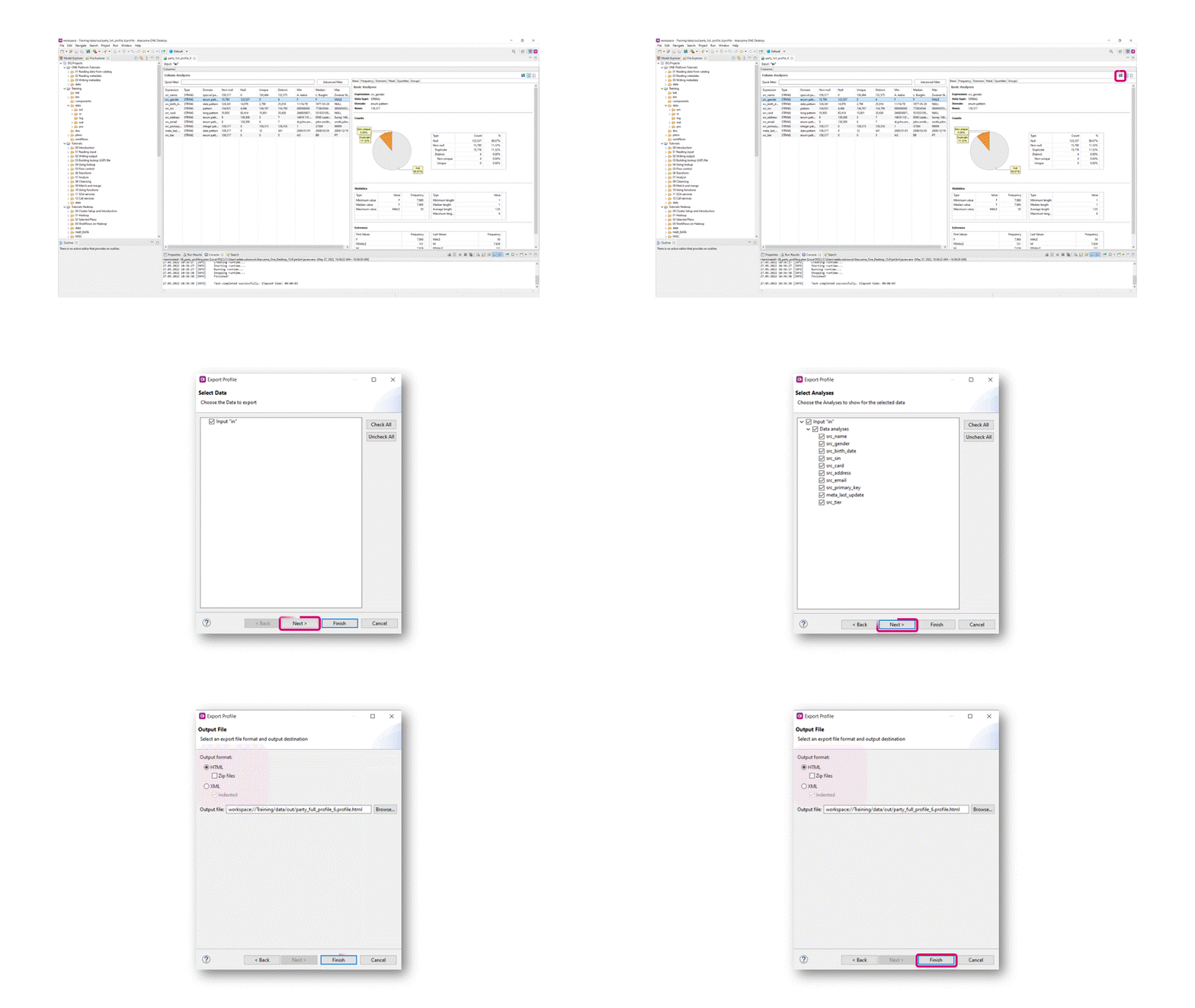
DQC profiles can be opened by Ataccama tools, but they can also be exported, so users with no access to the tool can view results or manage them. There are two formats offered: HTML for visual purposes, and XML for processing and information management purposes.To export aΒ profile,Β follow these steps:Open the profile to be exported Click theΒ ExportΒ button Select the data to be exported ClickΒ NextΒ to choose which format it should be exported to
In theΒ Getting Started with ONE DG: Collaboration & TasksΒ article, it mentions that you are able to delete tasks and all subtasks.Β Β Deleting: When you delete a task, all related subtasks and comments are deleted as well. You can delete subtasks and comments individually. To delete a task: Expand the more options menu of the task. Select "Delete". Confirm the deletion. Unable to locate Options Menu of the task to perform the deletion.Β What am I missing to perform these deletions?Β Β
Hello everyone,How can I replace null values in a column with a float data type in OneWeb? I need to substitute null values with 0 and apply a formula in advanced expressions.Thanks in advance.
I am getting started with ataccama at the moment so I was curious to know something. While I was exploring business terms I came across a thing in the settings section in a particular business term that goes as detection on tables so according to my understanding of ataccama detection rules are applied on business terms and then they are in turn applied to attributes so according this section can we apply detection rules directly on tables as well and can you please explain how does that work?Β
I am still building our solution to automatically create ServiceNow incidents for data quality issues. After creating an incident in ServiceNow you get a JSON body as response with a link to that incident. I want to store this link in a database and later check if the incident is still active.The URL looks like this;https://mydev.service-now.com/api/now/table/incident/a1b02c3456d78e9012f34g56h78i90jkIn my environment I have a generic server with the urlΒ https://mydev.service-now.com/, Now all we have to do, is add the second part dynamically and feed that to the Json Call step.My simple component to experiment with this looks like this:Β For now I'm just going to put the second part of the url in an Alter Format step:Β I believe I read somewhere that record_link must be mapped as a parameter for this to work. Only if you want to enter it as a value whenever you run the component or if you want to pass a parameter from a workflow. But that's not in my plans currently. So I won't map it as
So recently Iβve been working on workflows and schedulers, my current task is to schedule a workflow in/using the Webapp and not in IDE, is there any support documentation based on this problem? Iβve already completed the IDE workflow tutorials and scheduling workflows using one runtime server. Thanks!
Hi,Β I'm setting up an approval workflow in ONE Desktop and need to execute identical plans on Workflow state: Draft and Workflow state: Published, each having their own plan file. Although the plans are identical, I know for certain that the two outputsΒ should be different. However, I am currently getting the same output for both. BothΒ workflows consist of a metadata reader to anΒ excel file writer.Β Could there be a glitch running identical plans for different workflow states?
Hello Community,Β I use an import .csv file to load catalog item attribute data into OneWeb with a Desktop plan.The .csv file has the attributes in the same order as they appear in the underlying table.When these attributes are imported with the plan, in OneWeb for the catalog item I see the attributes in a different order as compared to the csv.Is there a way to keep the order in accordance with the import .csv file?Β Thank you in advance!
I am building a component that carefully prepares input in an Alter format step to be used in a Json Call that creates a ServiceNow incident. One of those added columns is called load_id. I want to store the output of the Json Call in a database table _with_ the load_id. So that I can relate data in the table with output with other tables.This is my Alter format step before the Json Call:load_id is mapped as a parameter coming from the workflow that runs the component. That works. And when I run the component standalone and fill in load_id by hand, that also works.So here is my data stream in the Json call:Adding load_id probably won't work here, because after all it's not part of the JSON output from the ServiceNow call.When I read the snowresponse data stream and send it to a Jdbc Writer I have no load_id. I've tried adding it as a shadow column, but the Jdbc Writer then complains that load_id is null (and I set the table column as not null).Β So the currently I use this hacky way to
I followed this example from my colleague Marnix Wisselaar to create a SQL Iterator.Iterating rows of a table (Record-by-record - SQL Iterator) in a workflow | Community (ataccama.com)Β I created a SQL Iterator task that runs this query:select mp_name , mp_gid , rule_name , table_name from SNOW.hlp_DQ_findings where valid_to is NULLΒ And it runs another workflow, that runs a component that does no more than writing the values of these columns in the iterator table and write the results to a text file.Β Β But for some reason my SQL Iterator workflow kept failing with this message:Task 'Run DQC' : failed with exception: Model is not valid.Β So I removed bits and parts to find out what the issue was. And I found out that if I left out just one of the 4 columns, the rule_name, the SQL Iterator and subsequent workflow and component ran just fine.I could not understand why only adding that column resulted into issues. So I decided to rebuild the entire workflow and component structure from scratc
Hi folks, I have a date format that I need to validate using a DGΒ rule in Ataccama ONE. I donβt need to do anything with it, just validate that the format is as expected. Any ideas on how I can achieve this please?Many thanksDCΒ
Currently we updating Catalog Items and Attribute metadata (description, classification, and terms) via desktop plan (bulk) and would like to create one overall task with sub-tasks for each βcategorizedβ catalog item or attribute.Β Example:Execution one desktop plan updates 100 attributes - SIN and SurnameΒ withΒ descriptions, classifications, or terms; Trigger aΒ creation of aΒ 1Β task called Review/Approve MetadataΒ with 2 sub-tasks based on the 2 attribute names Assign the tasks to a defaulted group (Data Catalog Enrichment Arbitration Group) with a requirement of all members of that group approved or reject with an reason prior to completing the task.Β
Hi everyone!We are continuing with our platform best practice series with Data Quality (DQ)! If you have missed the previous ones, so far weβve covered Data Governance and Data Observability. Check out the articles below:Β This post will provide an overview of the key features of Ataccama ONE Data Quality and help you get started! We will cover different functionalities under DQ in the following days and weeks.Before diving into the details, we recommend familiarizing yourself with the basic concepts described in our comprehensive guide. Although not mandatory, it will provide a solid foundation for this tutorial. However, you can still follow along without completing all the steps related to Catalog and Glossary.In this guide, we will primarily focus on two areas of the application: Data Quality and Business Glossary.Data Quality: This section serves as your central hub for data quality monitoring and rule development. It consists of several subsections: Rules: Create and manage data q
Hi,I have a table where a datetime column is present with several records:numberΒ Β datetimecolumn1Β Β Β Β Β Β Β 2024-02-01 00:00:00Β 2Β Β Β Β Β Β Β 2024-02-02 00:00:00I want a DQ Rule that filters out the datetime records that do not start with the first of the month. Meaning number 1 is valid, number 2 is invalid. I couldn't find anything useful in the condition builder option and the advanced expression (even through documentation in ONE expression) is giving me headache. Any suggestions how to fulfill this?
Hello,I am currently working on a data masking project in ONE Desktop and I'm seeking some advice on how to approach a specific scenario using two tables.I have two CSV files: Classification Table (CSV #1): This table contains two columns - 'ColumnName' and 'DataClassification'. The 'ColumnName' field lists the names of various columns, and 'DataClassification' provides their respective data classifications, such as "Restricted", "Confidential", "Public", or it may be blank. Data Table (CSV #2): This table contains multiple columns, named according to the entries in the 'ColumnName' field of the Classification Table. Each column holds different sets of data. Classification Table (CSV #1):ColumnName DataClassification Name Confidential Age Public Email Restricted Β Data Table (CSV #2):Name Age Email Alice 30 alice@example.com Bob 25 bob@example.com Β My goal is to mask the data in the Data Table (CSV #2) based on the classification provided in the Classificati
Hello hive mind,Has anyone out there who have RDM v14.3 or later, and successfully used the new RDM REST API feature?Weβve upgraded our dev environment to v14.5.1 this week, I tried the REST API, and it keeps returning with βjava.lang.Exception: org.springframework.security.access.AccessDeniedException: Cannot access entity: address_typeβ error. (Was trying to query my entity called address_type)I ensured my service account client has full access to the table. That service account client calls other API endpoints that I have built before on rdm-server and that authenticates fine.I wonder what Iβm missing. Anybody successful before and we can compare notes?Thanks!
Hi, I have my input like below example. May I know how can I transpose the data from columns to rows?Β Input Data:Β Pilot_Yr10 Vermont_Yr10 Pilot_Yr9 Vermont_Yr9 Pilot_Yr8 Vermont_Yr8 2014 2014 2015 2015 2016 2016 9.67 9.67 -3.76 -3.76 18.4 18.4 9.02 9.02 -4.33 -4.33 17.7 17.7 13.69 13.69 1.41 1.41 11.96 11.96 Β Expected Output Data:Β Β Period Pilot Vermont SI Since Inception 1/1/91 Since Inception 1/1/91 Yr1 2023 2023 Yr10 2014 2014 Yr2 2022 2022 Yr3 2021 2021 Yr4 2020 2020 Yr5 2019 2019 Yr6 2018 2018 Yr7 2017 2017 Yr8 2016 2016 Yr9 2015 2015
Hi Team,Β require help- when clicking on any entity in web URL, popup error box and not able to edit for seach any records.error- "getRowsWithDraftsFailed to determine origin for record party, id = 37104βΒ MDM log capture as per below:2024-02-09 19:24:33,338 β[39mDEBUGβ[0;39m [476bff][admin][http-nio-8050-exec-4] β[36mc.a.m.s.MdaRemoteServlet:31β[0;39m - actionId=findRecords() status=START2024-02-09 19:24:33,355 β[31mWARN β[0;39m [476bff][admin][http-nio-8050-exec-4] β[36mc.a.m.s.MdaRemoteServlet:51β[0;39m - actionId=findRecords() status=FAILURE message=findRecords() method failed. Error: Failed to determine origin for record party, id = 371042024-02-09 19:24:33,356 β[31mWARN β[0;39m [476bff][admin][http-nio-8050-exec-4] β[36mc.a.m.s.MdaRemoteServlet:51β[0;39m - actionId=findRecords() status=FAILURE message=findRecords() method failed. Description: java.lang.NullPointerException: Failed to determine origin for record party, id = 37104Β Β Β Β at com.ataccama.dqc.commons.util.AssertUtil.as
On my virtual desktop I have two ways I do an API call to ServiceNow to create an incident.With Postman it is working. I've managed to create an incident in ServiceNow serveral times.With One Desktop, with the same URL, header and JSON body I get Connection reset every time. And the Json call response debug file isn't even created.So here is my Postman setup:Authorization is a basic auth. Headers:When I run this I get the following response:{Β Β "import_set": "ISET0012345",Β Β "staging_table": "u_str_call",Β Β "result": [Β Β Β Β {Β Β Β Β Β Β "transform_map": "STR - Call API",Β Β Β Β Β Β "table": "incident",Β Β Β Β Β Β "display_name": "number",Β Β Β Β Β Β "display_value": "INC0217277",Β Β Β Β Β Β "record_link": "https://mydev.service-now.com/api/now/table/incident/8c47e2e6472fb11016fd2e61e36d4336",Β Β Β Β Β Β "status": "inserted",Β Β Β Β Β Β "sys_id": "8c47e2e6472fb11016fd2e61e36d4336"Β Β Β Β }Β Β ]}Now here is my One Desktop setup:And my component with Json Call:This is my Json Call:An
Querying APIs via GraphQLDid you know that your ONE solution already comes with a preconfigured GraphQL interface that can be used to run API queries in your web application?The GraphQL Playground is available at the following URL:Β <web_app_URL>/playground.Β You can use the queries for a wide range of operations to read or manipulate data in the Ataccama application, for instance:Listing your Catalog Items, associated Terms or Connection Sources Checking the status of your Catalog items Trigger a Profiling of a Catalog item Publish an Entity from a Draft state β¦ and many more!ExampleList all available Catalog items via a query:Β Make sure you get familiar with this powerful feature. Visit the following page and get familiar with the basicsΒ via following a series of simple use cases. Good luck!
Read the metadata from the connected source systems like descriptions, null constraints, policy tags, primary keys in Ataccama one
Hi All,require help on below error "This user does not have sufficient rights to access the applicationβ.
Would you like to cover the case what will happenΒ when a user enters her/his credentials incorrectly many times? The setting of Max Login Failure can be set in Keycloak Admin Console, follow these steps:Log intoΒ Keycloak Admin Console Go toΒ Realm SettingsΒ (Ataccamaone) on the left-hand menu Go toΒ Security DefensesΒ tab SelectΒ Brute Force DetectionΒ and enable the feature Set theΒ Max Login FailureΒ to the desired amountBrute Force Detection before enablementWhen enabled, all setting can be changed accordingly to your needsΒ Any question or comment? Let us know!
Already have an account? Login
No account yet? Create an account
Enter your E-mail address. We'll send you an e-mail with instructions to reset your password.