




Hi community 👋
Every now and then, we hear from our users wondering if it’s possible to spice up their Master Data Management (MDM) interface with something a little more visual.
Recently, I worked with one of our members who wanted to mark one of the records in a group as having a special meaning, so that it would instantly stand out to data stewards. While the logic behind selecting this record was complex, the outcome boiled down to a simple boolean flag, like cmo_preferred_flag = {true | false}. However, displaying such an attribute on the screen isn’t exactly thrilling:
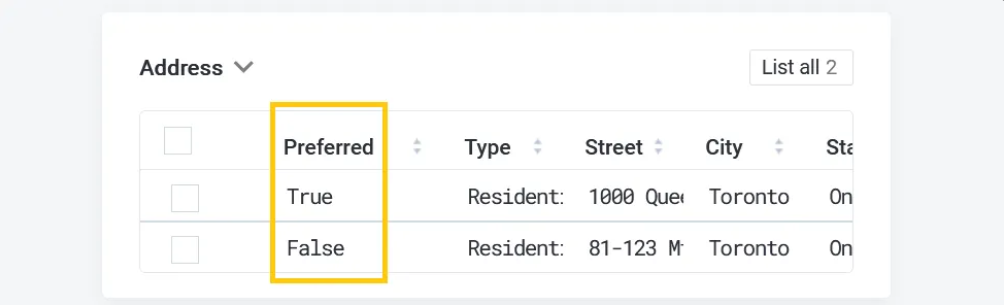
In earlier versions, it was possible to load an image file to represent things like this, but it required customization that was tricky to maintain. Plus, it often got wiped out when regenerating the MDM project. In our current versions (14.5.x / 15.x), we’ve moved to SpringBoot, and for security reasons, loading external static content is no longer supported.
So, can we solve this in a fun and practical way?
The emoji solution 😎
The good news? There’s a simple yet powerful alternative: Unicode! Yep, instead of loading images, we can turn to Unicode characters—specifically, emojis.
Now, you probably already know Unicode as a vast character set that includes fonts from across the world, even ancient scripts. But did you know it also contains a whole bunch of emojis? That’s right! You can find almost anything, from aliens 👽 to zebras 🦓.
Unicode is packed with goodies, and according to this Wiki article, there are entire blocks dedicated to emoticons, symbols, and pictographs, plus plenty more scattered across other blocks. Finding the perfect emoji can be as easy as a quick Google search for "Unicode emoji lookup." Go ahead, find your favorites—there are plenty to choose from!
Implementation: Bring on the emojis! 🚀
Found your perfect emoji? Great! Now, let’s display it in MDM.
First, make sure the database you're using to run the MDM repository can store and retrieve Unicode characters. This should be supported across all our platforms, but double-check that you’re using a compatible version. If you have database access, you can try inserting an emoji directly and see if you can pull it back out. If you're using Ataccama Cloud, you should be good to go since we run the latest tech stack there.
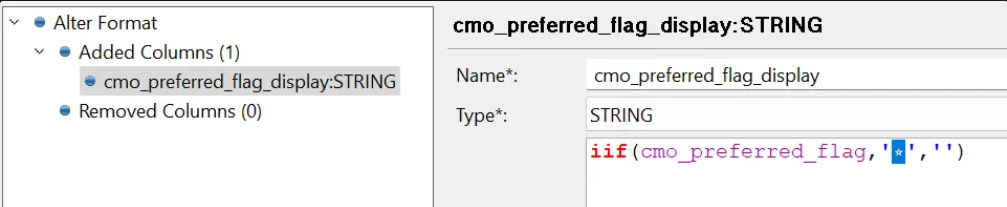
Next, simply add a new attribute with a String type to the MDM. Use your custom logic (cleansing, merging, etc.) to calculate the value of this attribute, and store the Unicode character. That’s it! Your emoji will now display natively in MDM.
Example: setting value of cmo_preferred_flag_display to hold the Unicode representation of the original cmo_preferred_flag column. Note that the highlighted character must be an exact copy/paste of the selected Unicode character. In this case what looks like a standard ‘asterisk’ character, is actually a literal copy of Unicode :star: character (it will be displayed by browser as ⭐):
Next up, use cmo_preferred_flag_display instead of cmo_preferred_flag in the template configuration and voilà!:
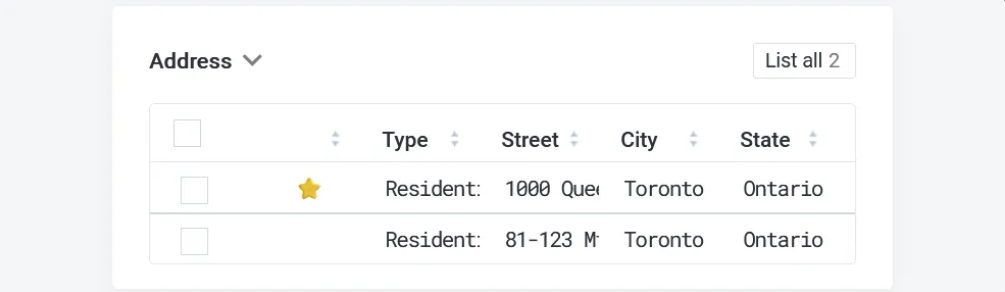
Using a separate attribute for display purposes is good, because your other interfaces (Rest APIs, MDM exports, etc.) can continue to provide the original boolean cmo_preferred_flag value to the downstream consumers.
By the way, there is no need to worry about storage—after all, you’re not saving images. Unicode characters take up a small amount of space: 1 byte (UTF-8), 2 bytes (UTF-16), or 4 bytes (UTF-32), depending on the specific character or set it comes from. Just make sure your MDM attribute can handle the size (1 to 4 bytes should cover it).
Found the perfect emoji, but it’s a little smaller (or maybe less colorful) than you imagined? Don’t fret, you can make it pop!
Sprucing it up with CSS 🎨
One of the coolest things about using Unicode characters is that you can style them using simple CSS, just like text!
There’s a default template.css in the etc/gui-templates directory that affects MDA layouts. However, I don’t recommend editing that file since your changes might get wiped out in future upgrades. Instead, create a custom CSS file specific to your project—something like template-myproject.css—in the same directory. Both CSS files will be loaded automatically, so you can tweak your emoji’s size, color, or any other style to your heart’s content.
To increase the size of the character:
#field\\|MASTER\\|masters\\|address\\|cmo_preferred_flag span {
	font-size: 1.2rem;
}
To style the character in arbitrary color just set the text color:
#field\\|MASTER\\|masters\\|address\\|cmo_preferred_flag span {
	color: darkgoldenrod;
}
Now your MDM doesn’t just manage data, it speaks it—with emojis! 🎉 Have fun giving your MDM interface that extra splash of personality, while keeping things efficient and secure.
Give it a try and let us know how it goes or if you have any questions in the comments below👇