
Question

How do I reference a parameter in an advanced express DQ variable? (v 15.4 on prem)

  • May 4, 2026
  • 2 replies
  • 16 views

Forum|alt.badge.img+2

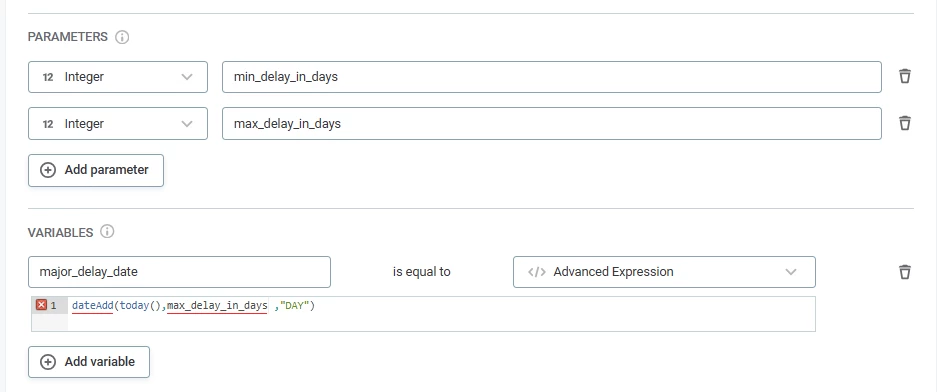
I am trying another way to deal with my strange timeliness issue.  Does anyone know how to reference a parameter in an advanced expression setting a variable?  As you can see it does not like me just using the name of the parameter, although it lets me use the name of an attribute just fine.

Any ideas?
 

2 replies

BrianF
Ataccamer
Forum|alt.badge.img+3
  • Ataccamer
  • May 7, 2026

Hi, The issue is that variables and parameters aren’t designed to work together, rather they are both designed to be used as part of rule conditions.

Variables are to apply transformations to your input attribute(s) such as make upper case, or trim spaces. Parameters are to set static values at the point of applying the rule, such as setting country codes, or min and max values as per your example.

I would use the variable expression as part of the rule condition in this case. It will still be able to use the value from the parameter.

I hope that helps!

Brian.


Forum|alt.badge.img+2
  • Author
  • Data Voyager
  • May 7, 2026

Thanks. I’ll make a suggestion to add this as functionality.  Right now, I cannot get the rule to work and was very much hoping to do it by using a parameter in the calculation of a variable.  I agree that you could just do it in an advanced expression on the rule, but that is also complicated to trouble shoot and doesn’t seem to be working.